Most phones have two speakers and two or more microphones: an earpiece (receiver) at the top for calls, a louder loudspeaker at the bottom, a primary microphone at the bottom, and one or more microphones near the top or the cameras. Before ordering a part, remove the case and screen protector, clean the openings, turn off Bluetooth and restart. Then test each part on its own: the phone's recorder app checks the bottom microphone, a video recording checks the top one, and a ringtone or music test checks the loudspeaker. Order only the part that fails its own test, matched to the exact model number.
What audio parts does a phone have?
The names vary by brand, but the layout is similar. Google describes Pixel phones as having 2 speakers and 3 identical microphones that are not all used at once. Samsung's support pages name the earpiece, the primary microphone at the bottom, and the external speaker. Apple's microphone tests use the bottom of the iPhone for calls and the top for video recording.
| Part | Also called | Where it usually sits | What uses it |
|---|---|---|---|
| Earpiece speaker | Receiver, top speaker | Top edge, above the screen | Calls held to the ear; on Pixel it also plays music with the bottom speaker |
| Loudspeaker | Bottom speaker, external speaker | Bottom edge, beside the charging port | Ringtones, alerts, media and speakerphone |
| Primary microphone | Bottom microphone | Bottom edge | Your voice on calls and voice recordings |
| Secondary microphones | Top or rear microphone | Top edge or near the rear cameras | Video sound, speakerphone and other recording; Google notes a pinhole in the Pixel camera bar can be a microphone |
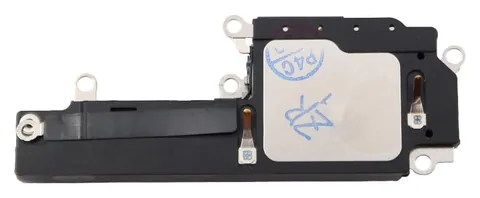
Most of these openings have a fine mesh or grille over them. Lint and dirt collect there, which is why cleaning comes before any parts order.
What should you rule out before blaming a part?
Apple, Samsung and Google all list similar non-hardware causes first. Work through them in order:
- Mute and silent settings. On iPhone, check the Ring/Silent switch or Silent mode in Control Center, and turn off Do Not Disturb. During a Pixel call, check that the microphone icon is not highlighted.
- Bluetooth. Turn it off. A connected headset or speaker can take the audio without you noticing.
- Cases, films and screen protectors. Remove them: Apple, Samsung and Google all list this step, and Google notes a case can block the microphones.
- Dirt in the openings. Clean gently: a small, clean, dry, soft-bristled brush (Apple) or a soft, lint-free cloth (Google). Samsung says not to use compressed air.
- Water. If the phone got wet, Samsung says to pat the earpiece, primary microphone, external speaker and USB port dry with a soft cloth, and to rinse with fresh water first after salt water, because dried salt can block them.
- Air pressure. After a flight or other large pressure change, Samsung says the speaker can sound quiet, crackly or distorted until pressure equalizes.
- Restart. Samsung suggests powering off for about 30 seconds. On Pixel 6 and later, Google says to hold Power and Volume up for a few seconds.
- App permissions and apps. If only one app has no microphone, check its permission (on iPhone: Settings, Privacy & Security, Microphone). Samsung suggests Safe mode to see whether a downloaded app is causing a speaker problem.
How do you test each speaker and microphone?
Test one part at a time, so you know exactly which one to replace.
| Part | iPhone | Samsung Galaxy | Google Pixel |
|---|---|---|---|
| Bottom microphone | Record in Voice Memos while speaking at the bottom of the phone, then play it back | Run the diagnostic tests in the Samsung Members app | Record a clip in the Recorder app and play it back |
| Top or rear microphone | Record a video while speaking at the top, switch to the other camera, record again, and play both back | Samsung Members diagnostics | Record a video with sound in the Camera app and check the audio |
| Loudspeaker | Settings, Sounds & Haptics: move the Ringtone and Alerts slider. No sound, or a dimmed speaker button, means the speaker may need service | Play music and use the volume buttons to confirm it is not muted; Samsung Members diagnostics | Play two or three different songs or videos from different apps; if all are distorted, contact support |
| Earpiece | Make a call with the phone held to your ear, after checking the receiver opening for dirt | Make a call held to the ear | Make a call held to the ear; the top speaker is the one used |
A part that passes its own test but fails during calls usually points somewhere else. Apple notes that static or crackling on a call can come from the network or reception, so retry from another place before opening the phone.
Which part do you replace?
- Earpiece fails, everything else works: replace the earpiece speaker. On some phones it is sold alone and on others as part of a small flex assembly, so check what the listing includes.
- Loudspeaker silent or distorted after cleaning and testing: replace the loudspeaker module at the bottom of the phone.
- Bottom microphone fails its recording test: on many phones the bottom microphone sits on the charging port flex or sub-board, so the fix is usually that whole flex or board rather than a microphone on its own.
- Top or rear microphone fails: its location varies by model, so open the phone and identify which flex or board carries it before ordering.
- Several parts fail at once: suspect liquid damage, a shared flex cable or the logic board, and diagnose before buying parts. See moisture alerts if the phone has also been blocking wired charging.
Whatever the part, match the exact model number, not only the phone's name. For a deeper bench walkthrough, this speaker troubleshooting guide for repair shops covers the same symptoms, and this earpiece and loudspeaker sourcing guide explains how replacement speakers are listed.
Questions
Why does a phone sound quiet or crackly after a flight?
Samsung says a large change in air pressure can make the speaker sound quiet, crackly or distorted until the pressure equalizes, and that sliding the SIM tray partway out for a moment can speed this up. Wait and retest before ordering a speaker.
Can you use compressed air to clean the grilles?
Samsung says not to use compressed air. Apple suggests a small, clean, dry, soft-bristled brush for the speaker and receiver openings, and Google suggests a soft, lint-free cloth.
Does the earpiece play music too?
On Pixel phones, yes: Google says both speakers play music, while calls use only the top speaker unless speakerphone is on. Other phones differ, so test the earpiece with a call held to the ear.
Callers cannot hear me, but a voice recording sounds fine. Is it the microphone?
Probably not. If the bottom microphone records clearly, check mute, Bluetooth, the app's microphone permission and the network first. Apple notes that static or crackling on a call can come from the network or reception rather than the phone.
Related guides
Sources
- Apple Support: If the microphones on your iPhone aren't working (published March 27, 2026)
- Apple Support: If you hear no sound or distorted sound from your iPhone, iPad, or iPod touch speaker (published March 16, 2026)
- Pixel Phone Help: Learn how your Pixel speakers and microphones work
- Pixel Phone Help: Why can't others hear me on my Pixel phone?
- Pixel Phone Help: Why can't I hear sound from my Pixel phone?
- Samsung US: Speaker does not work properly on Samsung phone
- Samsung Support: What to do if your microphone or speaker is not working properly
Sources checked November 12, 2026. Menu names and test apps change with software updates; confirm them on the linked pages.