A phone's physical controls are the side (power) button, the volume buttons and, depending on the model, an Action button, a Ring/Silent switch, Camera Control or a Home button. The vibration motor (Apple calls it the Taptic Engine) is a separate small part. Before ordering anything, remove the case and any film, clean around the button, and check the settings that can make a working part look dead. Then use the built-in test: Samsung Members diagnostics on Galaxy, the Pixel Repair Diagnostics App on Pixel. Replace only the part that still fails, matched to the exact model number.
What buttons and haptic parts does a phone have?
| Part | Also called | What it does |
|---|---|---|
| Side button | Power button; Samsung calls it the side key | Locks the phone, turns it off and wakes it. On iPhone, press and hold summons Siri |
| Volume buttons | Volume up and down | Media volume while something is playing, ringer volume otherwise (Apple's description) |
| Action button | Replaces the Ring/Silent switch on supported iPhones | Runs the action you choose with a press and hold; Silent mode by default |
| Ring/Silent switch | Mute switch | On older iPhones, shows orange when Silent mode is on |
| Camera Control | Camera button | On iPhone 16 and later models that have it: opens the camera, captures photos or video and adjusts camera settings |
| Home button with Touch ID | Home button | On iPhone 8 and earlier: goes to the Home screen and reads your fingerprint |
| Vibration motor | Taptic Engine (Apple), vibrator, haptic motor | Vibrates for calls and alerts and gives the small taps you feel when using the phone |
Inside the frame, a button cap presses a small switch that is usually carried on a flex cable running to the logic board. What a replacement part includes (the switch alone, a flex, or brackets and caps) varies by model, so read the listing before you order.
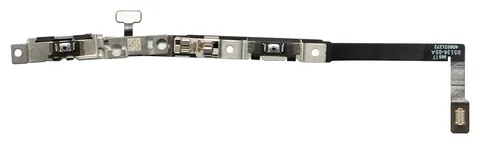
iPhone 16 power flex
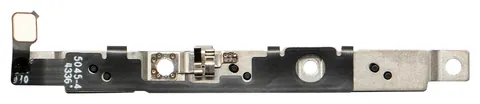
iPhone 16 volume flex
Which iPhone has which control?
The control on the left side of an iPhone changed over the years, so check which one the phone actually has before ordering a part. Apple's controls overview groups the models like this:
| Model group | Side button | Left-side control | Other controls |
|---|---|---|---|
| iPhone 16 and later models with Camera Control | Yes | Action button | Camera Control |
| iPhone 17e, iPhone 16e and iPhone 15 Pro models | Yes | Action button | None listed |
| iPhone 15 and earlier models without a Home button, except iPhone 15 Pro models | Yes | Ring/Silent switch | None listed |
| iPhone 8 and earlier | Yes | Ring/Silent switch | Home button with Touch ID |
| iPhone Duo | Yes, with Touch ID | None listed | Camera Control; volume buttons that can follow the phone's orientation |
On iPhone Duo, and on the Home button of iPhone 8 and earlier, Touch ID is built into the button, so that button is a fingerprint sensor as well as a switch. Check the repair information for that exact model before treating it like a plain button.
What should you rule out before replacing a button?
- Cases and films. Apple's first step is to remove protective films or cases that might block the button or switch. Samsung also says to check whether a case is stopping the buttons from being pressed properly.
- Dirt and debris. Check around the button and clean it with a soft cloth (Apple). Samsung names dust and other foreign material.
- What the button is set to do. On iPhone, the Action button works with a press and hold, can be set to No Action, and does nothing for the Controls, Shortcut and Accessibility actions until you pick a specific option. Check Settings, Action Button.
- Software. Samsung says outdated software can affect button functionality: Settings, Software update, Check for updates.
- The built-in test. On Galaxy, open Samsung Members, tap Support, then Get started under Phone diagnostics, and select Buttons. On Pixel 3 and later, Google's Pixel Repair Diagnostics App checks the phone before and after a repair.
- Settings reset (Galaxy). If the Samsung Members test finds no hardware problem, Samsung suggests Settings, General management, Reset, Reset all settings. Samsung says this does not delete personal data.
Apple says that if a button or switch still does not work, is damaged, or works only some of the time, it needs a repair. In the meantime, AssistiveTouch (Settings, Accessibility, Touch, AssistiveTouch) can lock the screen, change the volume and restart an iPhone without the physical buttons.
What should you rule out before replacing a vibration motor?
| Phone | Check |
|---|---|
| iPhone | Settings, Accessibility, Touch: Vibration must be on (when it is off, the phone does not vibrate at all, emergency alerts included). Settings, Sounds & Haptics: haptics set to play in Silent mode. Do Not Disturb off in Control Center. |
| Samsung Galaxy | Settings, Sounds and vibration: mode set to Sound or Vibrate rather than Mute; Call vibration and Notification vibration not set to Silent; Vibration intensity high enough for Call, Notifications, System and Media. Do not disturb off, app notifications on, and no Mode or Routine silencing the phone. |
| Google Pixel | Run the Pixel Repair Diagnostics App before opening the phone. |
Test with the settings confirmed: if the phone still gives no vibration for calls, alerts or the keyboard, the motor or its connection is the likely fault.
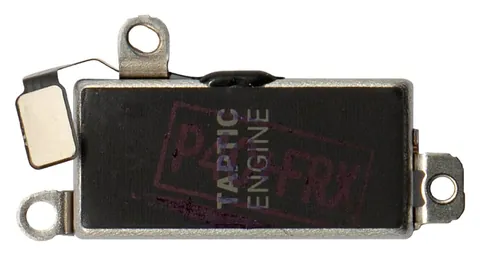
Which part do you replace?
- One button dead after cleaning, settings and the built-in test: replace that button's switch or flex. Depending on the model, one flex can carry more than one control, so check what the listing covers.
- A button that works only when pressed hard or at an angle: check the button cap, its bracket and the frame around it before replacing the flex; a new flex will not help if the cap no longer reaches the switch.
- A Touch ID button (iPhone 8 and earlier, iPhone Duo): treat it as a fingerprint sensor, not only a switch, and check that model's repair information first.
- No vibration with every setting confirmed: replace the vibration motor. It is a separate small part, and drops are a common reason it fails.
- Several controls fail at once: suspect liquid damage, a shared flex or the logic board, and diagnose before buying parts.
Match the exact model number, not only the phone's name, and test the new part before closing the phone. For a bench walkthrough on iPhone, this iPhone power button flex diagnosis guide covers the side button in more detail, and the iPhone 16 small parts category shows how these parts are sold for one model family: the power flex, volume flex and vibrator are listed as separate parts for each iPhone 16 model.
Questions
Can you keep using an iPhone with a broken side or volume button?
Yes, for now. Apple's AssistiveTouch puts an onscreen button in place of the physical ones: from its menu you can lock the screen, adjust the volume, restart the phone and take a screenshot. Turn it on in Settings, Accessibility, Touch, AssistiveTouch.
Does Reset all settings on a Galaxy phone delete your data?
Samsung says Reset all settings does not delete personal data. Samsung suggests it only after the Samsung Members button diagnostics finds no hardware problem.
The Action button does nothing when pressed. Is it broken?
Not necessarily. Apple says the Action button works with a press and hold, not a tap, and that it can be set to No Action. For the Controls, Shortcut and Accessibility actions you also have to pick a specific option, or the button does nothing. Check Settings, Action Button first.
Why does an iPhone not vibrate in Silent mode?
Apple says to check that haptics are set to play in Silent mode (Settings, Sounds & Haptics) and that Do Not Disturb is off. If Settings, Accessibility, Touch, Vibration is turned off, the phone does not vibrate at all, including for emergency alerts.
Related guides
Sources
- Apple Support: Use the volume buttons, side button, and other controls on your iPhone (published October 22, 2026)
- Apple Support: If the side button or another button isn't working on your iPhone or iPad (published January 28, 2026)
- Apple iPhone User Guide: Use and customize the Action button on iPhone
- Apple Support: Use AssistiveTouch on your iPhone, iPad, or iPod touch (published December 27, 2023)
- Apple Support: If your iPhone doesn't vibrate in Silent Mode (published July 14, 2026)
- Apple iPhone User Guide: Turn off vibration on iPhone
- Samsung US: Buttons do not properly work on Samsung Galaxy device
- Samsung UK: Galaxy phone vibration not working when receiving calls or notifications (last updated September 26, 2024)
- Pixel Phone Help: Repair your own Pixel device
Sources checked November 17, 2026. Menu names, test apps and model lists change with software updates and new phones; confirm them on the linked pages.